Your Salesforce Renewal Playbook

Renewal season is the most important stretch of the sales calendar, and the teams that see the most success set up Salesforce before the first renewal notice goes out. There are four long held best practices for running renewals in Salesforce: load your renewal opportunities, auto-close online renewals, build reporting that tells the story, and use lead scoring to prioritize. Those four pillars still hold up. What has changed is how much more the platform can do for you around each of them.
Below, we revisit each pillar and call out what's new. We've also added a new section on connecting Salesforce and Eloqua through Campaign Association, so your sales and marketing efforts finally show up in the same place. Plan ahead: lead scoring is due 2 weeks before launch, and all other renewal assets should be requested at least 1 week in advance. The timelines noted in each section below break down how much of that week each request takes.
1. Opportunities: Make the Renewal Opportunity Your Source of Truth
Work with your Salesforce administrator to load a renewal opportunity for every eligible account. That opportunity becomes the home for everything about that account's upcoming season: seat location, quantity, amount due, required donation, and seat selection time. When reps open an account, they shouldn't have to hunt across three systems to know where a renewal stands. Plan for 2 business days for your admin to load renewal Opportunities with products once your list is delivered, giving you adequate time to review the Opportunities after creation and confirm the numbers are accurate.
What's new:
Duplicate prevention. Before any renewal is created, the automation checks whether one already exists for that account, sport, and season. A simple "Renewal Created" flag or lookup keeps double-loaded opportunities from inflating your pipeline.
Data health checks. Stale or incomplete renewal Opportunities (missing amounts, past-due close dates, no recent activity) can be flagged automatically, so your pipeline reflects reality and your forecast stays honest.
2. Auto Close: Let the Technology Do the Easy Work
Set up automation that closes renewal opportunities to closed won when an account renews online. Every fan who renews on their own is one less call your reps need to make, which frees them to focus on at-risk or unresponsive accounts where a conversation actually changes the outcome. Standard auto-close is built as part of the Opportunity load, so it adds no extra time. Custom auto-close logic needs one additional business day, so share it with your admin when you deliver your Opportunity list.
What's new:
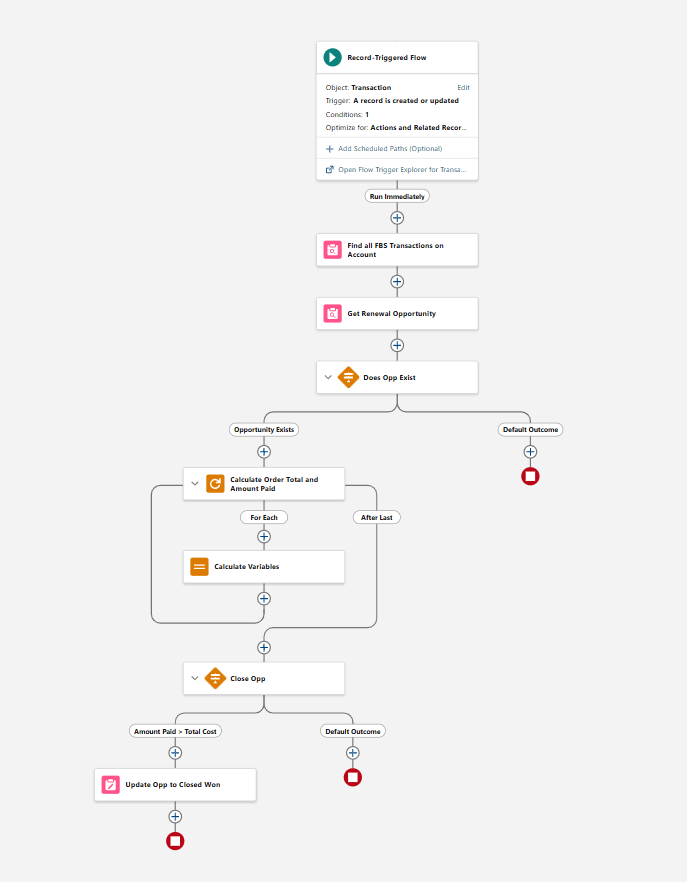
Partial renewals. If an account renews fewer seats than last season, the opportunity can capture the difference instead of just showing "renewed." That gives you a clear view of seats added and dropped, not just accounts retained.
Follow-up tasks on close. When a renewal closes, a flow can create a follow-up task for the rep, such as a thank-you call or an upsell conversation, so the relationship keeps moving after the payment clears.
Closed lost handling, too. Automation can move renewals to closed lost once the renewal deadline passes, keeping your open pipeline clean and making the at-risk list easy to find.
3. Reporting: Tell the Story as It Happens
Work with your Salesforce administrator to build reports and dashboards that reflect your key renewal KPIs. Show progress month over month, compare this year to last year, and track aggregate seats added and dropped as reps work through their call lists. The goal is reporting that works for you, so your team spends its time selling instead of building spreadsheets. Your standard pipeline dashboard can be updated as soon as your renewal Opportunities are created, with no additional lead time. Custom dashboards take 5 business days to build.
What's new:
Real-time renewal rate. A dashboard dial showing renewal rate against last season's pace at the same point in the cycle tells leadership in seconds whether you're ahead or behind.
Revenue, not just accounts. Track renewed revenue and donation dollars alongside account counts. A 90% account renewal rate can hide real revenue loss if your top-tier accounts are the ones dropping.
Rep-level views. Give each rep a dashboard of their own open renewals, sorted by risk, so their daily call list builds itself.
Campaign-level results. With Campaign Association (more below), you can report on which marketing touches actually moved renewals, not just which emails got opened.
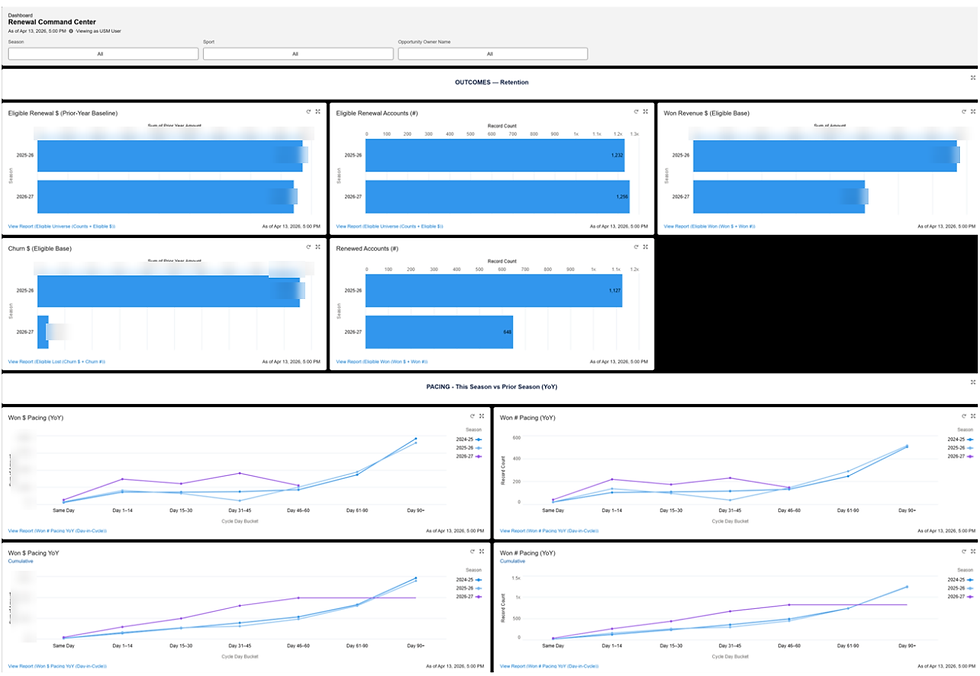
Southern Miss's Renewal Command Center puts retention, churn, and year-over-year pacing on one screen
4. Lead Scoring: Focus Your Reps Where It Counts
If you're a marketing automation customer, take advantage of lead scoring in Eloqua and bring those scores into Salesforce. Scores highlight the accounts most likely to renew and the ones showing signs of risk, so reps can prioritize. Tracking opening and closing scores also shows whether reps are driving engagement during renewal conversations and how accurate your model is. Lead scoring is hard to get right on the first try, so make sure to give your admin at least 2 weeks of lead time before launch. Plan to review the success of your lead score at the end of each renewal period. Comparing win % across score buckets is a quick way to do this.
What's new:
Engagement plus behavior. Combine email engagement with ticketing signals like attendance, tenure, and ticket transfer activity. A fan who opens every email but hasn't attended a game in two months is a very different conversation than one who never opens email but is in their seat every week.
Focus on first-year buyers. First-year season ticket holders are typically the highest churn risk. Flag them in Salesforce so reps reach out early with education on how to get the most out of their benefits.
Scores that drive action. Instead of a score that just sits on a record, use it to drive assignment, list views, and task creation, so the highest-priority accounts land in front of the right rep automatically.
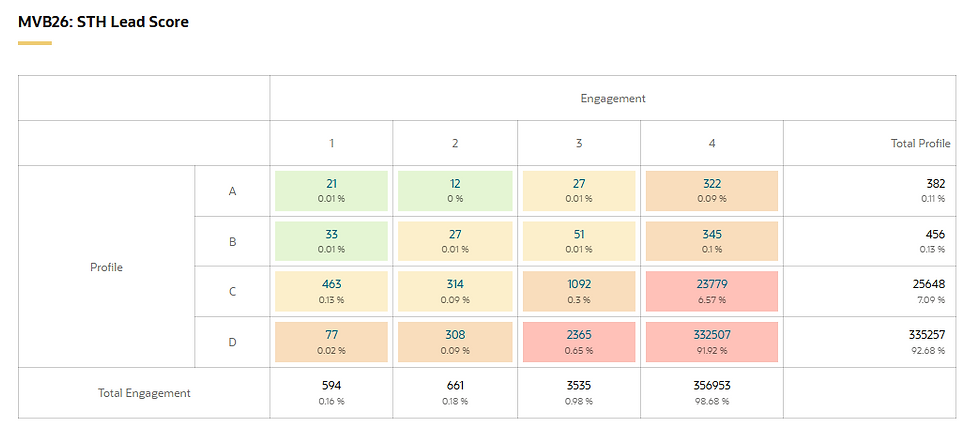
Hawaii's MVB season ticket lead score matrix: profile fit (A-D) by engagement (1-4), so reps know who to call first.
NEW: Connect Marketing and Sales with Salesforce Campaign Association
Most renewal campaigns run on two tracks at once: marketing sends the emails in Eloqua, and sales works the phones in Salesforce. Without a link between them, reps can't see which fans just opened the renewal reminder, and marketing can't prove which emails actually drove renewals. The Salesforce Campaign Association app in Eloqua closes that gap.
The app adds a step to your Eloqua Campaign Canvas that associates contacts with a Salesforce Campaign at exactly the moment you choose, such as when a fan clicks the renewal link or submits a form. That gives you more control over what gets sent to Salesforce and better reporting on marketing effectiveness in both platforms.
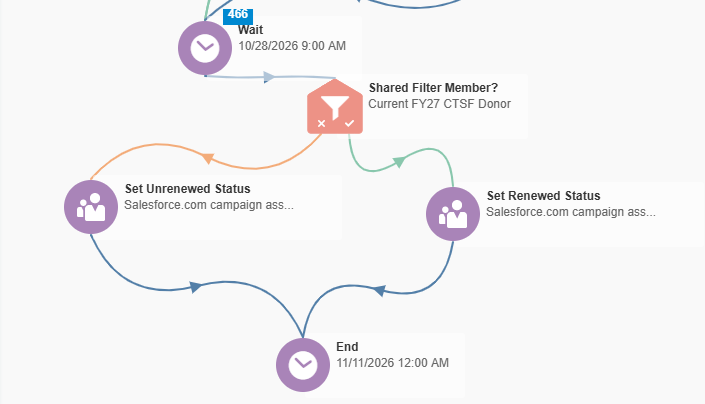
How it fits into your renewal campaign:
Create a Salesforce Campaign for the renewal (for example, "2027 Football Renewals") with member statuses that match your journey, such as Sent, Clicked, and Renewed.
Build your renewal email series on the Eloqua Campaign Canvas.
Add the Salesforce Campaign Association step where engagement happens, so each fan is added to the Salesforce Campaign with the right status.
In Salesforce, reps see campaign history right on the contact and account, and can prioritize fans who engaged but haven't renewed yet.
Report on Campaign Influence to connect marketing touches to closed renewal revenue.
Why it matters: Sales sees who is engaging in real time, marketing gets credit for the renewals it influences, and leadership gets one view of the full renewal effort instead of two disconnected reports.
Tips for getting it right:
Standardize Campaign Member statuses before launch so reporting is consistent from season to season.
Make sure fans exist as contacts in Salesforce before the campaign starts. If a record isn't in Salesforce yet, engagement that happens before it syncs may not be captured on the campaign.
Dashboard Ideas for Your Renewal Season
Reports you should already be using:
Accounts that have opted out of email communication
Accounts that have or have not engaged with renewal emails
Accounts that have paid for tickets but not their donation
Accounts with partial credits that need to complete payment
Accounts that missed their seat selection time
New additions worth building:
Renewal rate vs. last season's pace at the same date
Renewed revenue and donation dollars vs. goal
Seats added vs. seats dropped, by price level or section
First-year season ticket holders who haven't renewed
Fans who engaged with a renewal campaign but haven't renewed (via Campaign Association)
Open renewals with no rep activity in the last 14 days
Common Pitfalls to Avoid
Duplicate renewal Opportunities. Best practice is one opportunity per account, even if they have seats in multiple sections.
Stale Opportunities after the deadline. Open renewals that should be Closed Lost skew your forecast and bury the accounts that still need attention.
Tickets paid, donation missed. If the donation lives on a separate record, build a view that catches accounts that are only half renewed.
Marketing and sales in silos. Without Campaign Association, email engagement and rep activity tell two different stories.